SIM Table
The SIMs table is a central hub for the management of SIM cards that enables users to perform these tasks:
- View and manage allocated SIMs inventory
- Reallocate SIMs to child customers
- View SIMs status in real-time
- Manage related financial data
The SIMs table is a central hub for the management of SIM cards. The table lists all the SIMs that have been manufactured, provisioned and allocated to the current account and sub-accounts. The SIM table displays the operational status and attributes for each SIM in a separate row.
An example of the SIM data table is shown here.
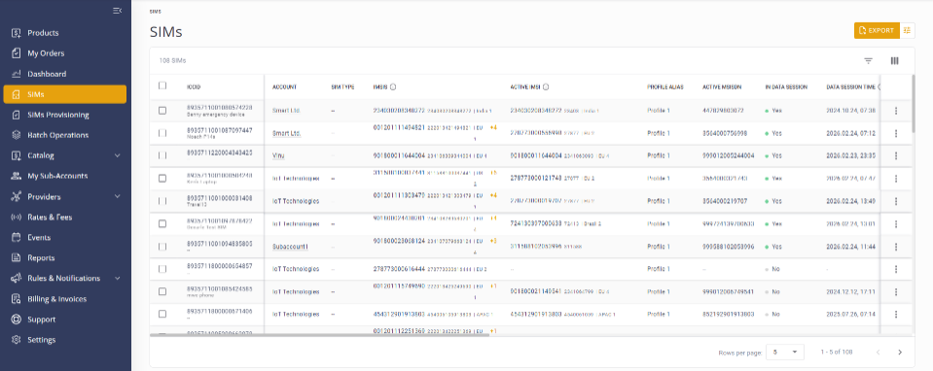
Table Columns
The columns in the SIM table can be filtered and organized based on the selected attributes described in this table.
| Attribute | Description |
|---|---|
| Account | The current account name the SIM is allocated to. |
| Active IMSI | The currently active IMSI used by the SIM. |
| Active IMSI Steering ID | The identifier used for IMSI steering. |
| Active MSISDN | Displays the active MSISDN currently used by the SIM. |
| APN | The Access Point Name used for data connection. |
| Applet Version | Version number of the applet installed on the SIM Card. |
| Buy Plan/Package | Shows the plans and packages created by the Parent account and attached to this SIM. |
| Card IMSI | The Actual IMSI programmed on the card. |
| Country | The last country in which the SIM established a connection. |
| Data Session Time | Display the date and time of the device last open/closed PDP session. |
| Data RAT | Indicates the Radio Access Technology (e.g., LTE, 3G, 2G) used for the data connection. |
| Data Record | Display the date and time of the device last created DR. |
| Data Usage (Period of Time) |
The current data usage information. The SIM's data usage shows the usage in three columns:
|
| EID | [eUICC SIM] The EID ID, which identifies this eUICC SIM (or eSIM). Hover the cursor over the EID icon to view the EID ID: Click the icon to copy the EID to the clipboard. This column is frozen in place and cannot be moved or hidden using Customize Columns. An empty cell (denoted by a hyphen) indicates that the SIM is a regular UICC SIM. |
| Element | Type of secure element (Plastic, Embedded, Integrated, Software, or Profile Only). |
| Form Factor | Physical size/format of the SIM (Plastic: 2FF/Triple Cut; Embedded: MFF2/MFFXS/USON‑8). |
| Grade | Environmental/durability rating (Default, Industrial, Automotive) of the SIM. |
| ICCID | The SIM’s ICCID and the user-assigned SIM alias. This column is frozen in place and cannot be moved or hidden using Customize Columns. |
| IMEI | The IMEI number of the device using this SIM. |
| IMEISV | Displays the IMEI number with an additional designation for the device firmware/software version |
| IMSIs | The list of IMSIs available on the SIM card. The IMSI column displays both Mapped and Card IMSIs. When there is more than one IMSI, the system displays the first IMSI followed by a “+” sign and the number of additional IMSIs (e.g., 123456677 +2). When you hover over the “+” sign, a tooltip is displayed to show the rest of the IMSIs. |
| In Data Session | Indicates whether the SIM is currently actively using a data session. |
| In Provisioning | Indicates whether the SIM is currently in the provisioning process. |
| Labels | One or more labels assigned to the SIM for grouping, searching, filtering, and performing bulk actions on SIMs with the same label. |
| Manufacturer | Vendor identifier for the SIM card (numeric IDs map to specific companies). |
| MSISDNs | Subscriber identifier by phone number assigned by the operator. For eUICC SIM (EID) with several profiles, the MSISDN of the currently active profile. When there is more than one MSISDN the system displays the first MSISDN followed by a “+” sign and the number of additional MSISDNs (e.g., 123456677 +2). When you hover over the “+” sign, a tooltip is displayed to show the rest of the MSISDNs. |
| Multi IMSI | Indicates whether the SIM includes multiple IMSIs |
| Profile Alias | [eUICC SIM] Applies to this EID, which may have several embedded profiles with different ICCIDs, only one of which is active. The profile alias of the currently active profile of this EID (eUICC SIM). |
| RAT | Indicates the Radio Access Technology (e.g., LTE, 3G, 2G) used for the SIM registration. |
| Sell Plan/Package | Shows the plans and packages created by your account and that are used to charge your Sub-account SIM. |
| Activation Type | Activation type: Method used to activate eUICC profiles (QR Poster, QR Single, IoT Profile). |
| SIM Type | OS installed on the SIM (e.g., UICC, eUICC Consumer/IoT/Constrained IoT). |
| SMS Usage for Period of Time |
The current SMS usage information. The SIM's SMS usage shows the usage in three columns identical to that for Data Usage:
|
| Status | Displays the current SIM status: Inactive, Inactive-Locked, Active, Suspended, Suspended - Locked SIM (due to IMEI), Terminated |
| Steering IDs | IDs used to select IMSIs during network attachment. |
| System Labels | Labels used to tag SIMs with system attributes (for example, EUICC, LPWA, etc.) and used in various business processes, such as generating reports, invoicing, and billing. Note that System Labels are assigned to SIMs during production and cannot be created nor edited using the platform portal. |